
How To Articles
How Local Services Ads Work, and What They Really Cost
Where Local Services Ads show, how the pay per lead billing really works, what drives ranking, and when a home service business should skip them.
Call (714) 823-3164 or ask a question. Clear recommendations, even if we never work together.
Local Services Ads sit at the very top of Google for home service searches. You pay for each lead, not each click. To run them you pass a license, insurance, and background check, which earns the Google Guaranteed badge. Ranking leans on how close you are, your reviews, your hours, and how fast you answer the phone.
Jump to a section
- Where the Ads Sit and Why That Spot Matters
- Paying Per Lead Instead of Per Click
- What It Takes to Get Verified
- What Decides Who Shows Up First
- Answering the Phone Is Most of the Job
- The Leads You Should Not Be Paying For
- When Local Services Ads Are the Wrong Buy
- From a Search to a Charged Lead
- Local Services Ads, Search Ads, and the Map Pack
- Before You Switch Local Services Ads On
- Questions Owners Ask in the First Month
- Questions
Where the Ads Sit and Why That Spot Matters
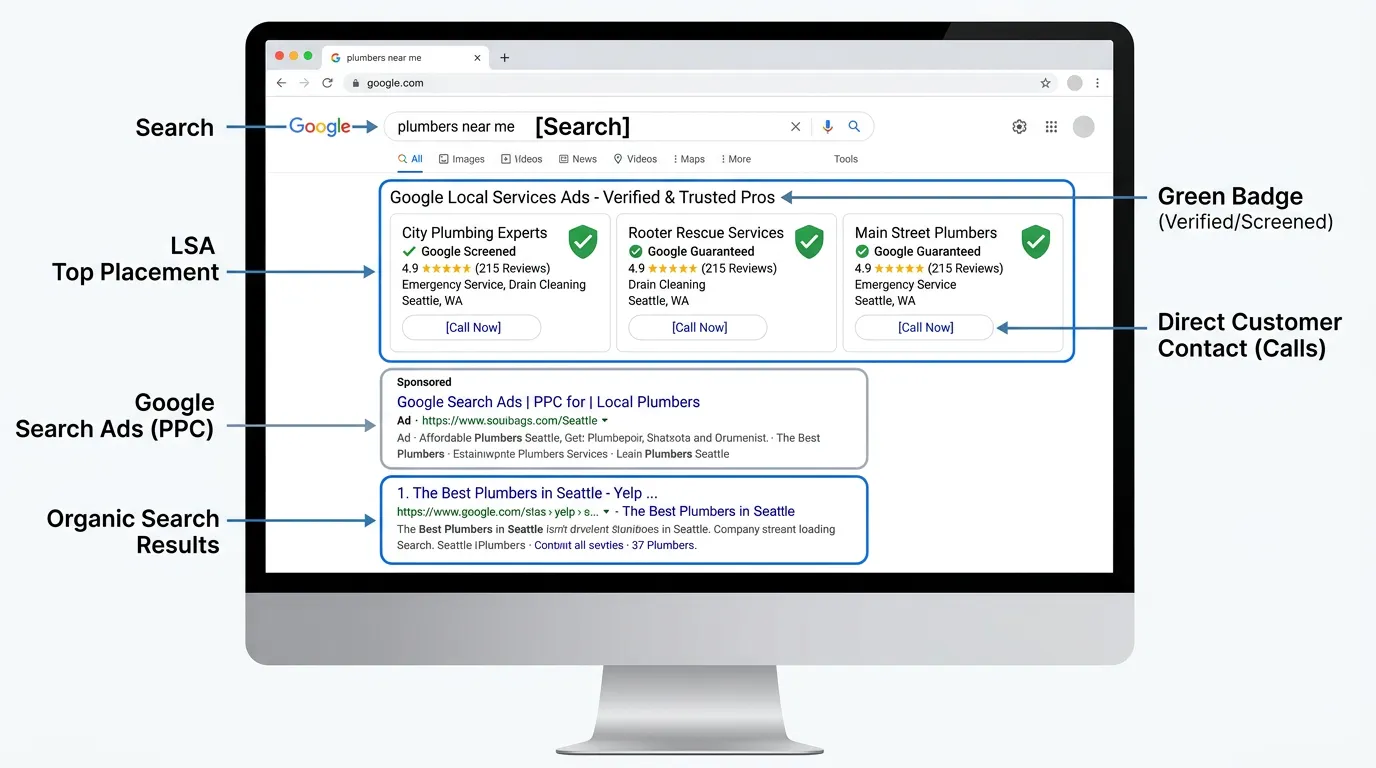
Local Services Ads sit at the top of the results, above the regular text ads and above the map. On a phone that means they own the first screen, and for a lot of home service searches the first screen is the whole decision. Three businesses usually show at once. Each one gets a name, a review score, a photo, and a green check that reads Google Guaranteed or Google Screened. Guaranteed covers home trades like plumbing, roofing, and heating. Screened covers professional services such as law and financial work. The badge is the point. It tells a stranger that Google looked at a license, an insurance certificate, and a background check before letting that business show. For a homeowner about to let someone into the house, that does a lot of quiet work. The listing also behaves differently from a search ad. Tapping it does not send anyone to your website. It opens a panel with your reviews and job types, and the buttons either call you or send a message. There is no landing page in the middle. That cuts both ways. A weak website stops being the bottleneck, which helps. You also lose the chance to explain anything before the phone rings. What you control is the review score, the job types, the hours, the service area, and how fast someone picks up.
Paying Per Lead Instead of Per Click
The billing is the biggest break from Google Ads. You get charged when a customer calls, leaves a voicemail, or sends a message through the ad. You are not charged for a tap. Prices move by trade and by county. In Southern California most home trades land somewhere near 25 to 90 dollars a lead, and a few categories run well above that. Here is the math that matters, using a made up example. Say a plumber pays 60 dollars a lead and books one job out of every three leads. That is 180 dollars of ad cost per booked job. If the average job is 450 dollars, the ads are doing their work. If the average job is 200 dollars, they are not, and no setting inside the dashboard closes that gap. So the numbers to know before you start are not the lead price. They are your booking rate and your average job value. Most shops guess both, and guess high. Count them for one month first. Budget works weekly here, not daily. You set a weekly figure and Google can spend above it on a busy week and below it on a slow one, and it balances out across the month. Raising the budget makes you show more often. It does not lift you above a closer competitor with better reviews.
What It Takes to Get Verified
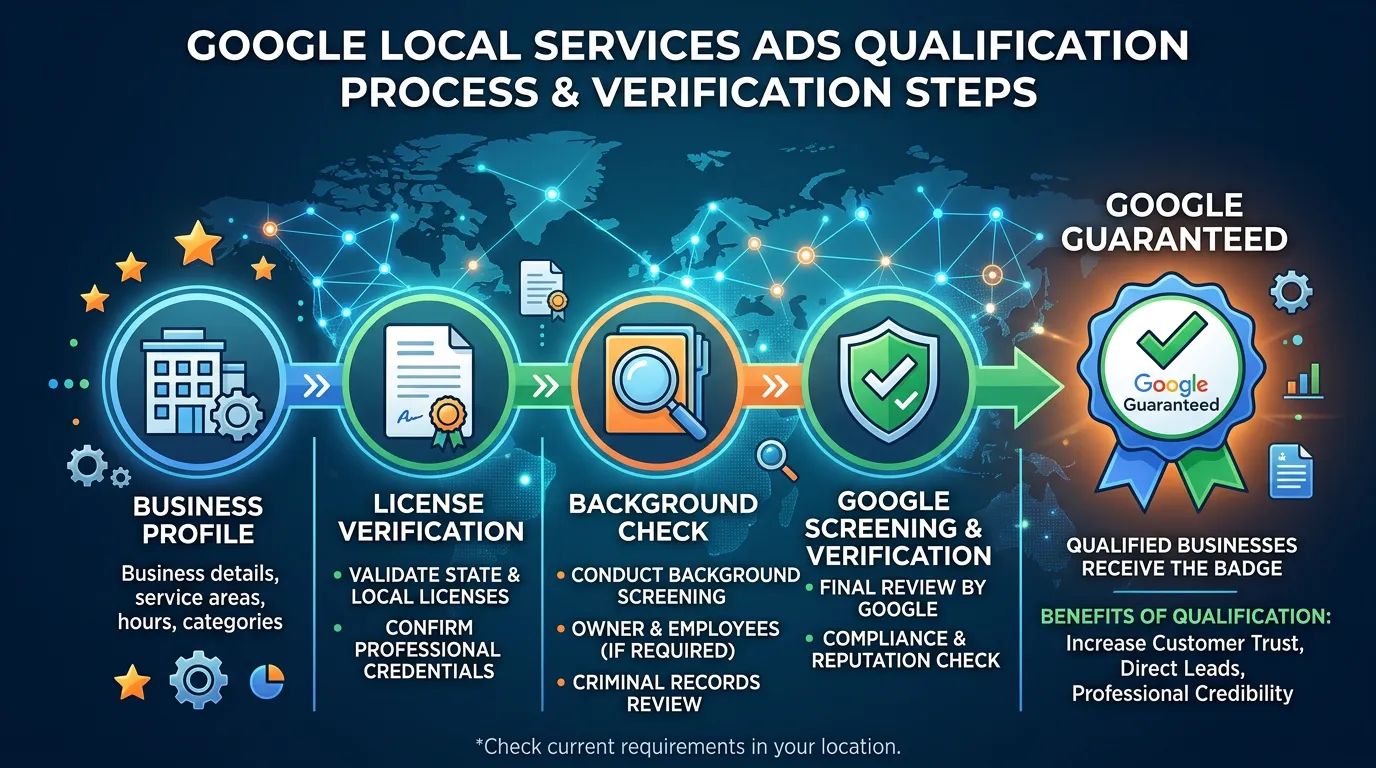
Getting in takes paperwork and patience. Google checks three things: an active license for your trade, general liability insurance that meets its minimum for your category, and background checks on the business and usually on the owner. In California the license check runs against the state board, so confirm your record is active and clean before you apply. Timing is the part owners are least ready for. Two to five weeks is normal, and it runs longer when the screening company is backed up. The business check moves fast. The owner check is the slow one, because it sits with an outside vendor and Google cannot hurry it either. Almost every stalled application starts with a document, not a decision. The insurance certificate names a slightly different entity than the license. The coverage amount sits below the minimum for that job category. The policy expires in six weeks. The owner name on the ID is missing a middle initial that appears everywhere else. Any one of those restarts the clock without telling you. Two habits prevent most of it. Have the certificate issued with the exact legal name that appears on your license and your Google Business Profile. Then watch the inbox you gave them, spam folder included, because the screening company emails you and then waits for a reply that never comes.
What Decides Who Shows Up First
Money does not buy position in this product, which surprises people arriving from Google Ads. The signals are plain enough to act on. How close you are to the person searching. Your review count and score inside the Local Services profile. Your listed hours, and whether you are open at the moment they search. How fast you answer, and whether you respond to leads at all. And whether you have open complaints or a poor record on past leads. Two of those deserve attention this week. Reviews come first, and there is a catch most owners miss. Local Services reviews only come from leads that came through the ad. The 200 reviews on your map listing do not carry over. You have to build the pile again, and the request has to go out from the Local Services dashboard soon after the job while the customer still remembers you. Hours come second. Listing yourself as open 24 hours because it sounds impressive, then not answering at night, is worse than listing the truth. You get charged for calls you miss, and missing them works against you. Set the hours you actually cover, then extend them when you have someone to cover the extension. Everything on this list is operations, not advertising, which is why the product rewards well run shops.
Answering the Phone Is Most of the Job
The cheapest ranking factor in the whole product is picking up, and it is the one most shops fail. Leads arrive as calls and as messages, and both get billed. A missed call is money spent on nothing, and it also tells Google you are slow. Three fixes cover most of the damage. First, decide who answers during business hours and who covers the rest, by name, not as whoever is nearest the phone. Second, turn the message lead type on only if somebody checks it several times a day. If messages sit until evening, switch it off. Third, call back missed leads within five minutes, not at the end of the day. A homeowner with a leak calls three companies and hires whoever answers. Here is a hypothetical that makes the cost real. A roofer takes 40 leads a month at 55 dollars each, so 2,200 dollars. Eight of those calls go to voicemail and four never get returned. Roughly 220 dollars went in the bin, plus whatever those four jobs were worth. No campaign setting recovers that. An answering service usually costs less than the leads it saves. If nobody can commit to answering, do not turn this product on yet. Pay per lead punishes a slow phone much harder than pay per click does.
The Leads You Should Not Be Paying For
You will get charged for calls that were never a fit. Some of those can be credited and some cannot, and knowing the difference is worth real money. Google credits leads in a few clear cases: the caller wanted a service you do not offer, the job sits outside your service area, the call was spam or a sales pitch, or nobody actually made contact. It does not credit a real customer who picked another company. It does not credit a price shopper who asked a fair question and moved on. That is a sale you lost, which is a different problem with a different fix. The mechanics are simple and the timing is not forgiving. Disputes have a window, so a weekly ten minute review beats a monthly sitting where half the leads have aged out. Open each charged lead, listen to the recording, and pick one of Google's own reasons. Say what happened in one sentence. Name the zip code when the job was out of area. Quote the caller's own words when you have them. Credits usually land within a week or two. Two habits pay for themselves here. Switch off job types you do not want, so you stop buying those leads at the source. And keep a short log of what got credited, because the pattern shows you where the money leaks.
When Local Services Ads Are the Wrong Buy
This product does not suit everyone, and it is worth saying so plainly. Skip it if your trade is not eligible in your county, because coverage varies by category and area and the list changes. Check before you build a budget around it. Skip it if your average job is small. At 25 to 90 dollars a lead and a booking rate near one in three, ad cost per booked job lands somewhere near 100 to 250 dollars. A 150 dollar service call cannot carry that, no matter how the ad is set up. Skip it if nobody answers the phone reliably. That is the same warning as before, and it is the most common reason a shop quits after two months. Skip it if you only do commercial or new construction work, because the searches here come from homeowners with a problem today. Go in with open eyes if volume in your area is thin. Some categories in smaller markets produce a handful of leads a month, which is a fine supplement and a poor plan. Where it does fit, it fits well. Emergency trades with real margins, a fast phone, and a service area that matches where the money is. Run it alongside search ads rather than in place of them. Local Services has no keyword control and a hard volume ceiling. Search ads have volume and control, and cost more per lead.
From a Search to a Charged Lead
Five steps sit between a homeowner searching and a charge on your account. Only two of them are inside the dashboard.
The charge lands at step four whether or not anyone answers. That is why the phone matters more than the settings.
Local Services Ads, Search Ads, and the Map Pack
These three fight for the same screen and work nothing alike. Most home service businesses end up running all three.
| What you compare | Local Services Ads | Search ads | Map pack |
|---|---|---|---|
| What you pay for | Each lead | Each click | Nothing |
| Where it sends people | A Google panel | Your landing page | Your profile |
| Keyword control | None | Full | Indirect |
| Time to first lead | After verification | Same day | Months |
| Badge on the listing | Google Guaranteed | None | None |
| Bad leads refunded | Sometimes | Never | Not applicable |
| What lifts you | Reviews and speed | Bids and quality | Distance and profile |
Notice the last row. Local Services rewards how you run the business. Search ads reward how you run the account.
Before You Switch Local Services Ads On
Verification gets all the attention. These are the things that decide whether the spend pays back once you are live.
A named person answers calls inside a minute
Missed leads are still billed
Your booking rate is measured, not guessed
Count last month's leads and jobs
Average job value covers the ad cost per job
Lead price divided by booking rate
Listed hours match hours you truly cover
Do not claim nights you cannot staff
Job types you do not want are switched off
You buy every type left turned on
A review request goes out from the LSA dashboard
Map reviews do not carry over
Someone owns the weekly lead review
Ten minutes, same day each week
Leads get marked booked or lost somewhere
Otherwise cost per job stays unknown
Questions Owners Ask in the First Month
Why did my ad stop showing halfway through the week?
A competitor with fewer reviews outranks me. Why?
Do I need a website to run these ads?
Would rather we handled it?
This article covers how to do the work yourself. If you would rather have it done for you, that is what our pay per click advertising service is.
Pay Per Click Advertising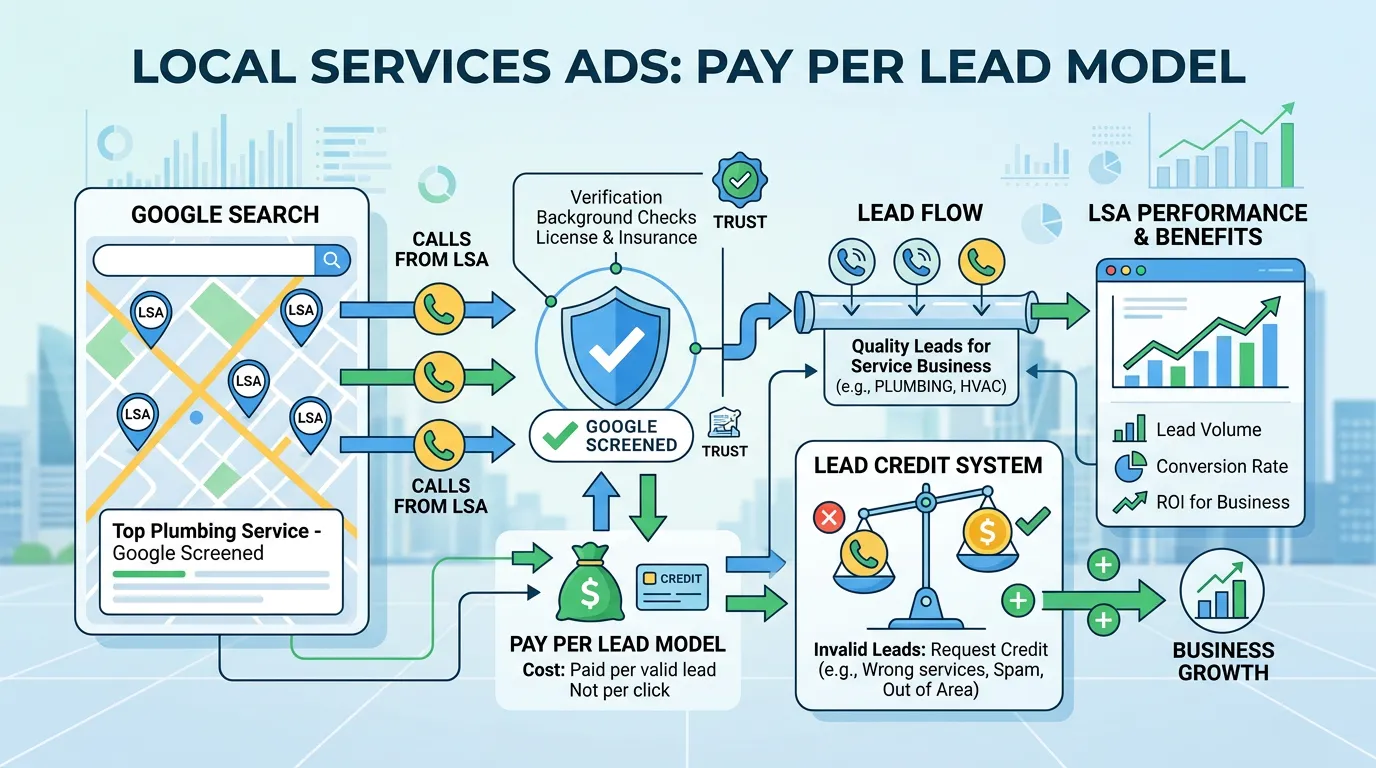
Frequently asked questions
Is Google Guaranteed the same as being verified on Google Maps?
Can I run Local Services Ads and Google Ads at the same time?
Do my existing Google reviews show inside the ad?
How much should I budget to start?
What happens if I pause it?
Sources
- Local Services Ads Help: How leads work(opens in a new tab) Local Services Ads charge for each valid lead rather than per click, and lead prices vary by location, job type, and lead type.
- Google Local Services Ads Help Center(opens in a new tab) Google documents eligibility, verification requirements, budgets, lead disputes, and the review process for Local Services Ads.
- California Contractors State License Board(opens in a new tab) California contractors can confirm that a license is active and unrestricted, which is the record checked during Local Services verification.