Lead Generation Systems
CRM Integration and Lead Routing
Every lead lands in one system with its source attached
- Timeline
- Eight to nine weeks for a full integration including cleanup and training
Call (714) 823-3164 or ask a question. Clear recommendations, even if we never work together.
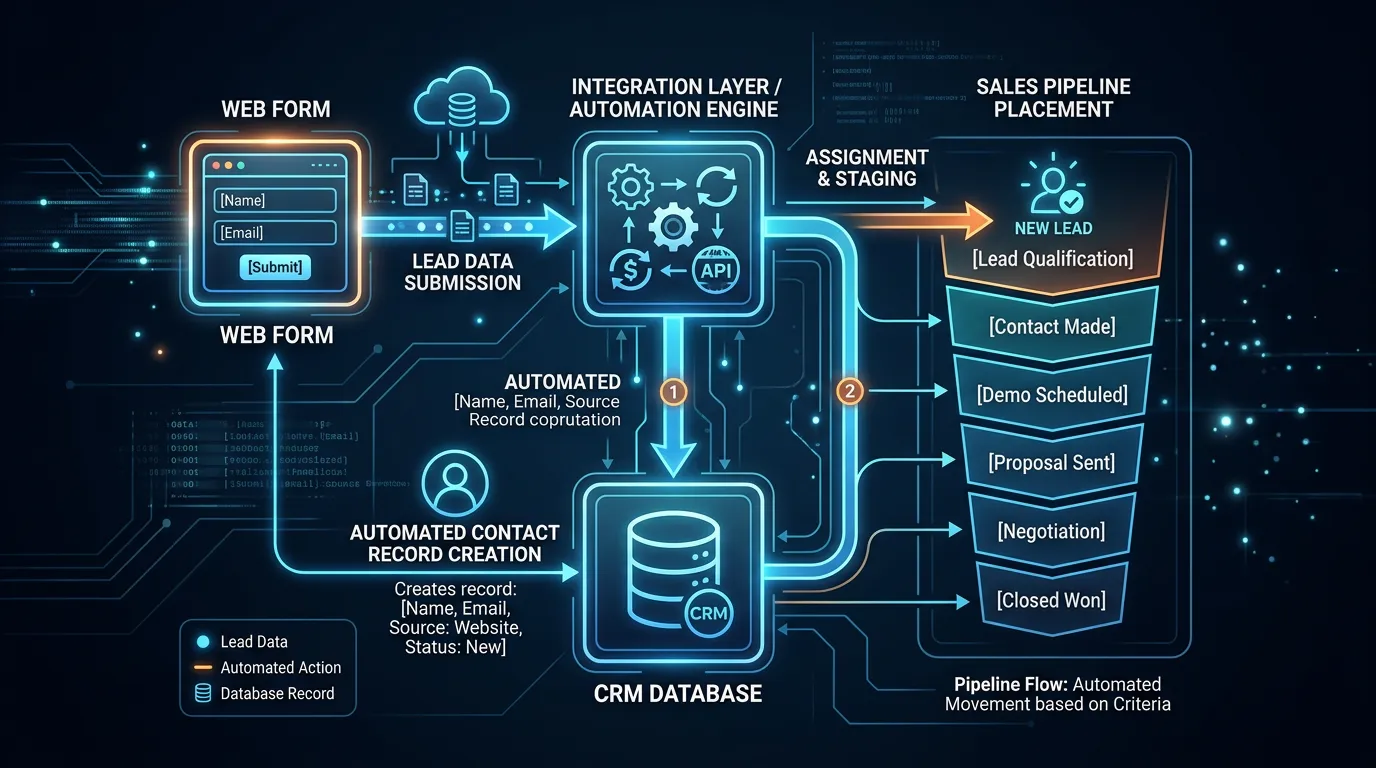
CRM integration connects your website, phone system, and ad platforms to one customer database, so every lead arrives automatically with its source attached. It replaces inbox based lead handling with a pipeline. Nothing gets forgotten, and the whole team can see what stage every deal is at.
The problem
Leads live in five places. Some in the office manager's inbox, some in a text thread on the owner's phone, some on a paper pad by the desk, some in the ad platform, and some in voicemail. Nobody can see the full picture, so leads get missed and customers get called twice by two different people. When the office manager takes a week off, half the pipeline goes with her. And because the source never travels with the lead, the CRM cannot tell you whether Google Ads or the map pack produced the jobs you actually booked.
What it is
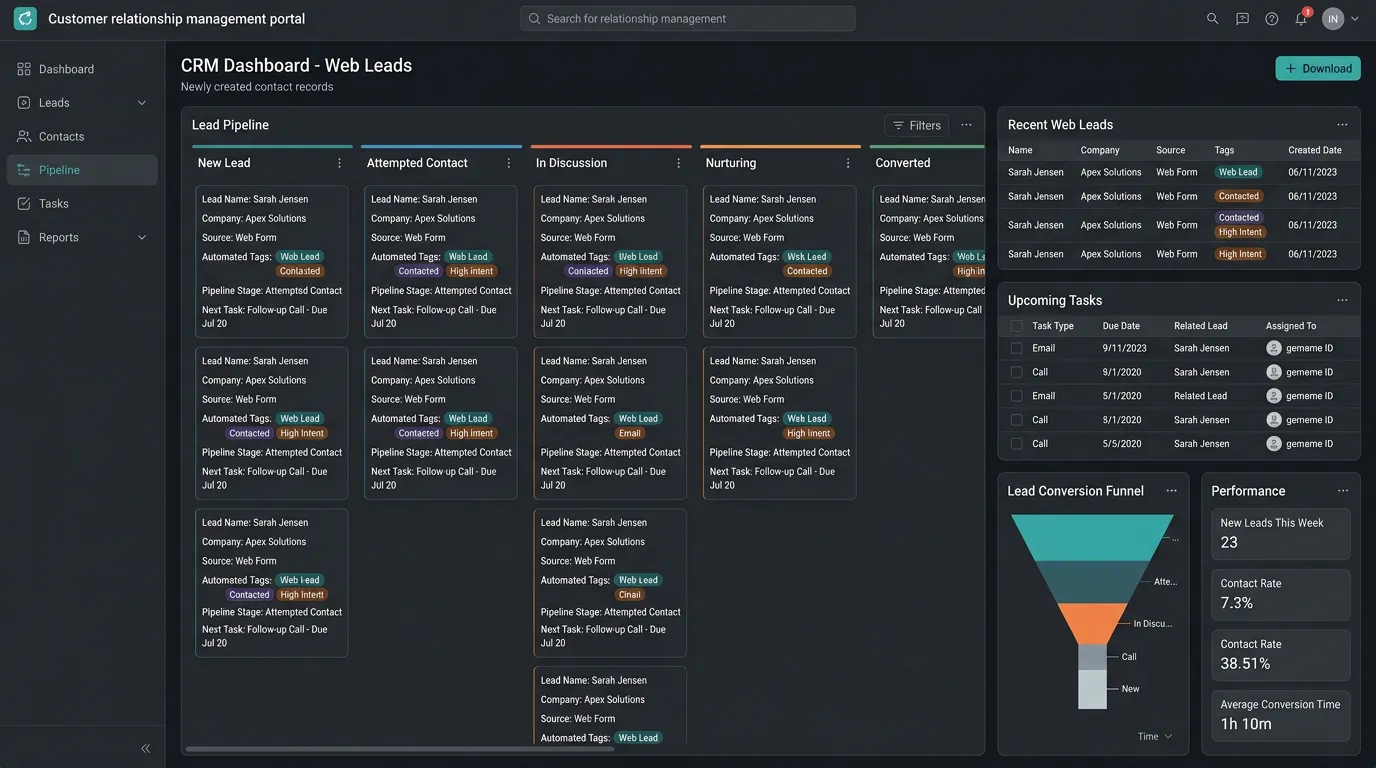
CRM integration means every entry point writes into the same system. Website forms post straight in through a webhook or a Zapier connection. Call tracking pushes calls in with recordings and source data. Chat and booking tools connect the same way. Fields get mapped so campaign, medium, landing page, and keyword survive the trip. Deduplication rules merge repeat contacts. The customer who called Tuesday and filled out a form Thursday becomes one record instead of two. Pipeline stages get built to match how you sell, not a generic software default. Then automations handle the parts people forget. The lead gets an instant text confirming receipt, the assigned rep gets an alert, and a task appears if nobody has touched the lead within an hour.
Signs you need this
- Leads live in an inbox, a text thread, and a notepad at the same time
- Two people have called the same customer about the same job
- You cannot see which leads came from which campaign inside your CRM
- When one employee is out, nobody knows the status of their deals
- New leads sometimes go a full day before anyone responds
What is included
- CRM selection guidance if you do not have one, based on your workflow not features
- Website form to CRM connection by native integration, webhook, or Zapier
- Call tracking to CRM sync including recordings and source data
- Field mapping so source, medium, campaign, and landing page persist on the record
- Deduplication rules that merge repeat contacts into one customer record
- Pipeline stages named for how your business sells, with entry and exit criteria
- Speed to lead automation: instant customer acknowledgment and internal alert
- Stale lead tasks that resurface anything untouched past a set time
- Reporting views showing leads by source, stage, and rep
- Team training session and a one page reference for daily use
Our process
Map Current Lead Flow
Week 1We document every way a lead currently enters and where it ends up. The map usually reveals two or three paths nobody in management knew about, like a form on an old landing page emailing a former employee.
Choose or Clean the CRM
Week 1 to 3If you have Jobber, Housecall Pro, ServiceTitan, HubSpot, or Go High Level we work with it. If the existing database is a mess of duplicates, cleaning comes before connecting anything new to it.
Connect Every Source
Week 3 to 5Forms, calls, chat, and booking all get wired in with source data attached. Native integrations first, webhooks second, Zapier last, because each added layer is another thing that can silently break.
Build Stages and Automations
Week 5 to 7Pipeline stages get defined with clear entry criteria so two people move a deal the same way. Then instant acknowledgment, rep alerts, and stale lead tasks get turned on and tested with real submissions.
Train and Watch
Week 7 to 9We train the people who use it daily, not just the owner, and then watch the first two weeks closely. Adoption problems show up immediately as leads that stop getting stage updates.
Realistic timeline: Eight to nine weeks for a full integration including cleanup and training. A simple connection to an existing well kept CRM can be done in two to three weeks.
Picking a CRM by how your team actually works
Feature lists all look alike. What matters is whether the software matches the shape of your day. This is roughly how the common choices sort out.
| If your business | Look at | Why it fits | What to watch |
|---|---|---|---|
| Dispatches trucks every day | Jobber or Housecall Pro | Scheduling, invoicing, and payments built in | Marketing reporting is thin |
| Runs 20 plus techs and inventory | ServiceTitan | Deep field service tools and real reporting | Cost and setup time are both large |
| Sells projects over weeks | HubSpot | Strong pipeline, email, and deal tracking | You still need a scheduler |
| Wants forms, texts, and pipeline in one | Go High Level | Everything under a single login | One vendor holds all of it |
| Gets under two leads a week | A shared sheet and a calendar | Cheap, and honestly good enough for now | It breaks fast once volume grows |
The best CRM for you is the one your office is still using six months from now.
The first hour after a lead arrives
Speed to lead is not one action. It is a short chain of automatic steps with a human in the middle of it.
Automation cannot sell the job. It can make sure nobody has to remember.
Clean the data before you connect anything
Wiring new sources into a messy database multiplies the mess. This comes first, and it usually takes about a week.
Export a full backup first
Before a single merge runs
Find duplicates by phone, not name
One name gets spelled six ways
Make phone formats consistent
Automations fail on odd ones
Remove dead email addresses
Bounces hurt future sending
Decide what one record means
A person, a property, or both
Retire stages nobody uses
Old ones confuse new staff
Give every open lead an owner
Unassigned leads get ignored
Write the merge rules down
So the next import matches
Field mapping in plain English
Field mapping means deciding where each piece of information lands, and making sure it survives the trip. It sounds dull. It is also the part that breaks most often.
Here is the usual failure. A visitor arrives from a Google Ads campaign. Hidden fields on the form catch the source, medium, campaign, and landing page. The form posts to the CRM, the CRM has no campaign field, and that value is dropped. Six weeks later nobody can say which campaign produced the job.
Source also dies on the phone. Someone who dials a number off a truck wrap has no website session at all, so the source has to come from the tracking number itself.
One more choice matters. Store the source on the job, not only on the customer. A homeowner who found you in the map pack two years ago and clicked an ad last week is two different sources, and only a job level record can show that.
Practical questions before you start
What does an CRM integration cost to run each month?
Can we start with Zapier and move to a real CRM integration later?