Google Business Profile Optimization
Google Business Profile Questions and Answers Management
Anyone can answer questions about your business, including competitors
- Timeline
- Audit and cleanup in the first 2 weeks
Call (714) 823-3164 or ask a question. Clear recommendations, even if we never work together.
Google Business Profile Q and A management means seeding, answering, and monitoring the questions section on a business listing. Anyone on the internet can ask or answer a question there. Unmanaged sections often carry wrong information, and the answer with the most upvotes is the one searchers see first.
The problem
The Q and A section is the least monitored part of a profile and one of the few where strangers can publish information about your business. Real examples are common: a random user answering that a business is closed permanently, a competitor answering do they do this service with a curt no, or a question about pricing sitting unanswered for eight months while hundreds of people read it. Whatever sits there is what a customer reads while deciding to call.
What it is
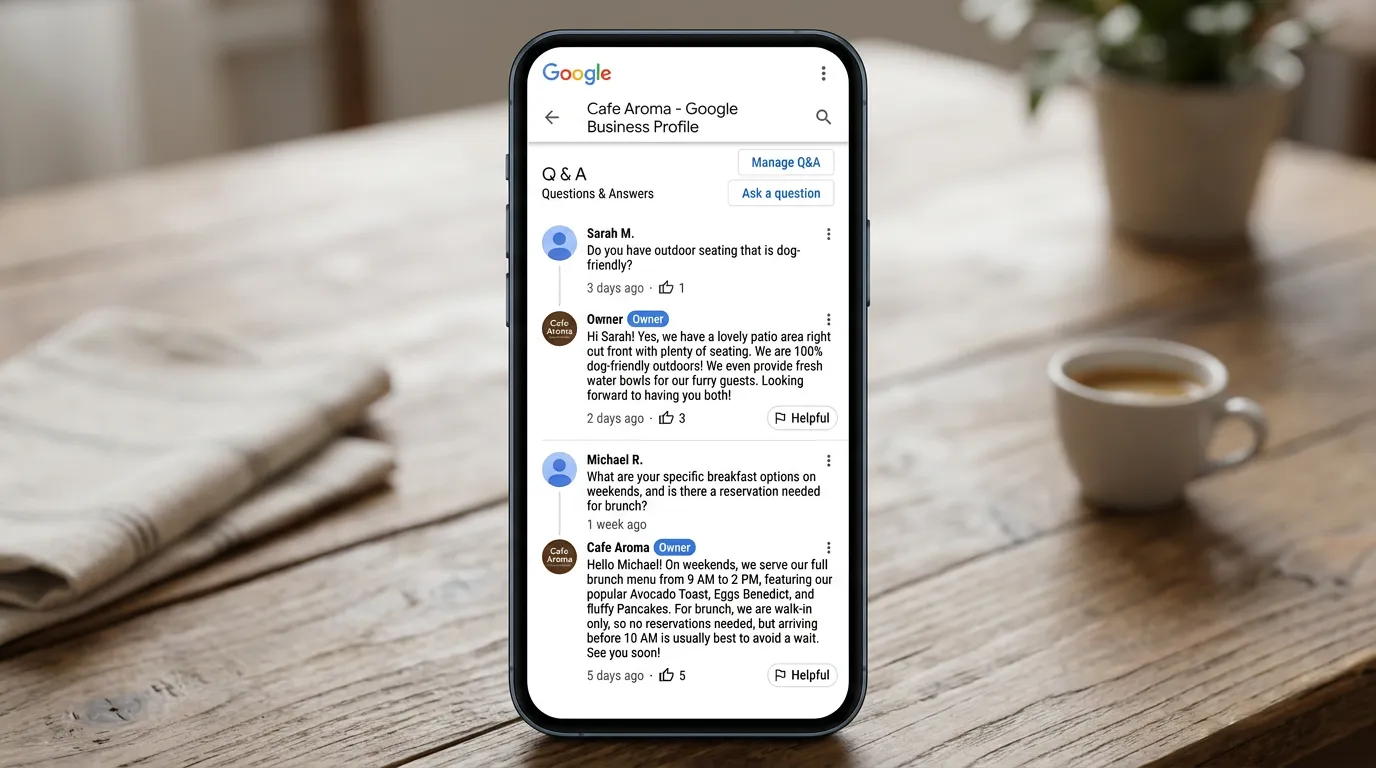
Every Google Business Profile has a questions section, and it shows in Search and Maps. Anyone with a Google account can post a question, and anyone can answer. Answers get upvoted. The one with the most votes displays first, no matter who wrote it. Owners can post questions themselves, and Google clearly allows this. You then answer from the business account, where the answer carries an owner label. Managing this section means seeding the questions your customers really ask and answering them clearly. It also means checking for new questions daily and reporting answers that are false or break policy.
Signs you need this
- Your profile has questions nobody from your business has answered
- Someone incorrectly answered a question about your services or hours
- The top answer on your Google business profile was written by a stranger
- The same question comes up on the phone five times a week
- You did not know the questions section existed
What is included
- Audit of all existing questions and answers with accuracy flags
- Removal requests for false, spam, or policy violating content
- Eight to fifteen seeded questions covering real customer concerns
- Owner answers written for the questions your phone staff hear most
- Upvoting of correct answers so they display first
- Daily monitoring alerts for new questions posted by the public
- Response standard of 24 hours on business days for new questions
- Quarterly refresh as services, pricing, and hours change
Our process
Audit what is there
Week 1We read every existing question and answer, flag anything false or outdated, and check which answer currently displays first. Profiles that have never been managed often have surprises nobody knew about.
Clean up the wrong information
Week 1 to 2False or policy violating answers get reported for removal. Where removal is unlikely, we post a correct owner answer and upvote it so the accurate response outranks the wrong one in the display order.
Seed the real questions
Week 2 to 3We collect the questions your office actually answers on the phone: do you charge for estimates, do you take my insurance, how soon can you come out, do you work weekends. Those get posted and answered from the business account.
Set up monitoring
Week 3, then ongoingGoogle notifications for new questions are unreliable, so we add a third party alert or a manual daily check. New questions get an owner answer within one business day, before a stranger answers first.
Refresh quarterly
Every 3 monthsPrices change, service areas change, hours change. Every quarter we reread the answers and update anything stale, since an outdated answer is nearly as damaging as a wrong one.
Realistic timeline: Audit and cleanup in the first 2 weeks. Seeding complete by week 3. Monitoring is continuous from then on, with a one business day response standard for new questions.

Who Can Do What in the Questions Section
This section works differently from reviews, and the difference is the whole reason it needs managing. Here is who holds which lever.
| Action | You, the owner | Any Google user | What it means for you |
|---|---|---|---|
| Post a question | Yes | Yes | You can seed the ones you want asked |
| Answer a question | Yes, with an owner label | Yes | A stranger can answer before you do |
| Upvote an answer | Yes | Yes | Votes decide which answer shows first |
| Remove someone else's answer | No | No | You can only flag it and wait |
| Delete a question | Only your own | Only their own | Cleanup is possible but limited |
The two levers you fully control are being first and being upvoted. Both are free.
Writing Answers That Do Their Job
An answer here is read by everyone who looks at your Google business profile afterward, not just the person who asked. Write it for the audience, not the asker.
Do this
- Answer in the first two sentences, then add the detail underneath
- Give a number whenever the question is about price or timing
- Say no plainly when the answer is no, and say who does that work
- Edit an existing answer rather than posting a second one
- Ask a few staff members to upvote the correct answer
Not this
- Do not paste a sales pitch into an answer
- Do not answer a hostile question in a hostile tone
- Do not seed a question you would not want a competitor to read
- Do not post an answer that is only a phone number
- Do not leave an answer up once the price inside it is out of date
Seeding Questions Without Making It Obvious
Seeded questions read badly when a marketer writes them. What makes your company the best choice in the area is not a question any human has ever typed. Nobody upvotes it, and one of them makes the whole section look staged.
Pull from the phone instead. Ask whoever answers your phone to write down every question they hear for one week. You will end up with twenty, and most of them collapse into three or four worries: what it costs, how soon someone can come out, whether you are licensed, and whether you handle their exact situation.
Post the question from a personal Google account and answer it from the business account so the answer carries the owner label. Then space them out over two or three weeks. Fifteen questions appearing within an hour looks like exactly what it is.
The Answer Nobody Wants to Write: Price
Cost is the question people ask most and the one businesses dodge most. A dodge does more damage here than a number, because the reader assumes the number must be bad. Then they call the Google business profile below you that answered.
Give a structure instead of a dodge. Say what the diagnostic or trip fee is, whether it gets applied to the repair, and a range for the two or three jobs you do most. Note what moves a job to the top of that range.
This filters, and filtering is the point. A homeowner who reads the range and calls anyway is a better lead than one who called only to find out.
Handling the Awkward Ones
Should I answer a question that is really a complaint?
How do I find new questions if Google does not tell me?