
How To Articles
How Marketing Automation Actually Works
A plain walk through of what a trigger is, how a wait step works, and what happens to one lead from the moment a form comes in.
Call (714) 823-3164 or ask a question. Clear recommendations, even if we never work together.
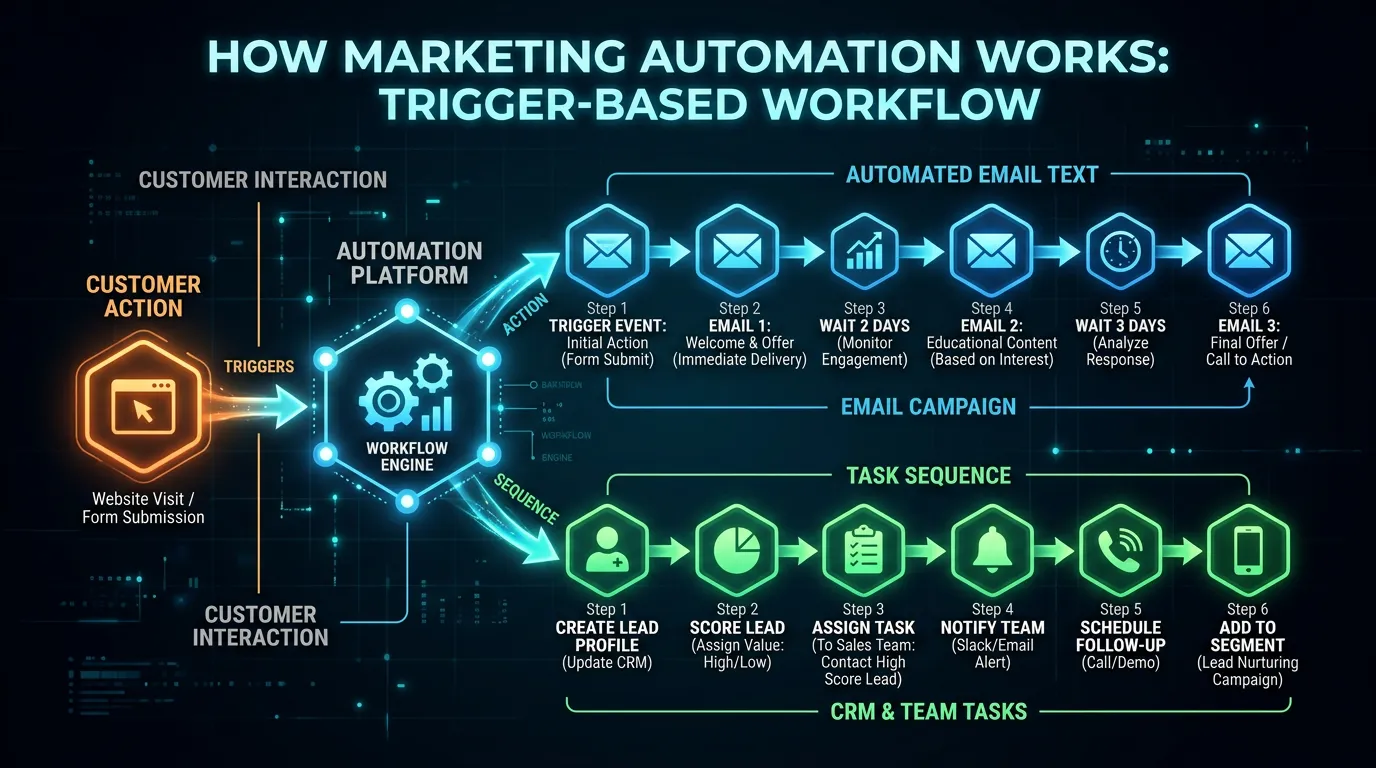
Marketing automation is software that sends a message when something happens. Someone fills out a form, buys, or goes quiet, and the system reacts on its own. You write the rules once. After that the follow up runs on time, every time, without anyone remembering to send it.
Jump to a section
- What Marketing Automation Actually Is
- The Five Parts of Every Automation
- Where the Data Comes From
- How One Lead Moves Through the System
- Automated Sends and Broadcasts Do Different Jobs
- What Makes an Automation Quietly Stop Working
- The Path of One Automated Message
- Triggers Worth Building First
- Three Things Automation Will Not Do for You
- Questions People Ask Before They Start
- Questions
What Marketing Automation Actually Is
Strip the word down and it means one thing. Software watches for an event, then sends a message about it. That is the whole idea. A customer books a job, and a confirmation goes out. A lead asks for a quote and never replies, and a reminder goes out three days later. Nobody sat down and hit send. The rule did it. This is not new. The same logic runs your bank alerts and your dentist reminders. What changed is the price. Tools that once cost thousands a month now start near free for a small list, so a two van plumbing shop can run the follow up a national chain runs. The word automation misleads people. You still write every word. The software only decides who gets it and when. Think of it as a patient assistant with no judgment at all. It sends exactly what you said, to exactly who you said, forever, until you change the rule. That is the strength and the risk in one sentence.
The Five Parts of Every Automation
Every marketing automation, in every tool, is built from the same five parts. Learn them once and every platform stops looking strange. The trigger is the event that starts things. A form gets filled in. An invoice gets paid. A tag gets added. The condition is the question the system asks before it acts. Is this person a lead or a past customer? Did they buy in the last year? Do they live in a zip code you serve? The wait is a pause. Three days. Two weeks. Six months. Waits are what make a sequence feel human instead of frantic. The action is the thing that happens. Send an email. Send a text. Add a tag. Alert your office. Push a note into your job software. The exit is the rule that pulls someone out of the sequence. Beginners skip it, and that is how a customer who already booked gets a fourth email asking if she is still interested. Write the exit rule first.
- Trigger: the event that starts it, like a form or a paid invoice
- Condition: the question asked before anything sends
- Wait: the pause between steps, from hours to months
- Action: send, tag, alert, or update a record
- Exit: the rule that removes someone who already replied or booked
Where the Data Comes From
None of this works without a clean contact record. That record is the whole system. It holds the address, the name, the marketing automation service they asked about, the date of the last job, and a set of tags. Tags are just labels you attach, like heat pump, or past customer, or asked in July. The rules read those tags and decide what to send. So the real work is getting good data in. Most shops pull from four or five places. The website form. The booking or job software. The point of sale. The phone system, if it captures a caller. And the old spreadsheet somebody keeps on a desktop. Each one has to hand its data to the email tool, either through a built in connection or a small bridge app. Pick one source to be the truth. When two systems disagree about a phone number, you need to know which one wins. Without that rule you get duplicates, and duplicates mean one person gets the same email twice. One more habit saves pain later. Agree on how a field is written before anyone types it. A city spelled two ways becomes two segments.
How One Lead Moves Through the System
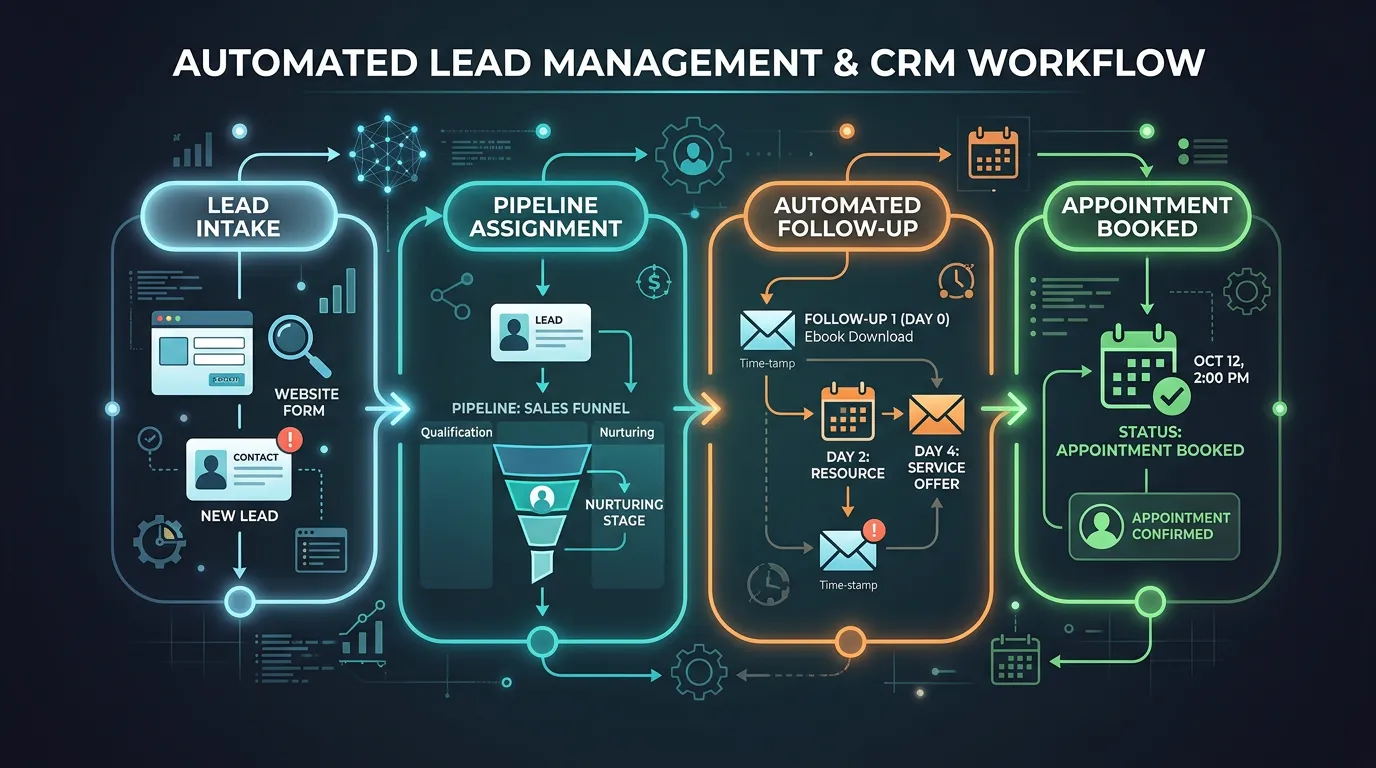
Here is a made up example to make it concrete. A hypothetical heating and air company gets a form at 9:40 on a Tuesday night. Nobody is in the office. The trigger fires the moment the form saves. Within a minute the lead gets a reply that names the person who will call and gives a window for that call. That one message does more for the close rate than the rest of the sequence, because the other three companies she contacted will answer in the morning. At the same moment the system texts the on call tech and tags her as a quote request. At eight the next morning she is at the top of a list, not buried in an inbox. Say the tech quotes her Wednesday and she goes quiet. On day three she gets a short email on why one bid runs higher than another. On day seven, a photo of similar work. On day fourteen, a last short note. If she books, the exit rule pulls her out and the sequence stops.
Automated Sends and Broadcasts Do Different Jobs
There are only two kinds of email you will ever send, and mixing them up wastes a lot of effort. An automated send is tied to one person's own timeline. It fires on day three of their inquiry, or eleven months after their last service. It runs whether or not you are at your desk, and it keeps working for years. A broadcast goes to a group on a date you choose. A spring tune up offer. A note that you now cover a new city. A price change. These are the ones people picture when they think of email marketing, and they are the ones that eat time, because someone has to write each one. Here is the part that surprises owners. The automated messages usually earn more per send, because they arrive when the person is already thinking about the problem. The broadcasts fill the gaps and keep your name familiar. You want both. If you only have time for one this quarter, build the automated follow up for new leads. It pays first.
What Makes an Automation Quietly Stop Working
Automations fail silently. That is what makes them risky. A broken email does not throw an error you can see. It just stops sending, and you find out in April that nothing went out since January. Four things cause most of it. Someone renames a tag or a list, and every rule pointing at the old name goes dead. A connection between your website and your email tool expires, usually after a password change or a plugin update, and forms stop passing data. An offer inside a sequence goes stale, so a lead gets a February coupon in August. Or a person lands in two sequences at once because the exit rules overlap. The fix is a calendar item, not a tool. Once a month, put yourself through your own forms with a real address you can check. Watch what arrives and when. It takes about fifteen minutes. Then open the reporting screen and look at how many people entered each automation last month. A number that dropped to zero is your answer. If you would rather not own that check, hand it to someone who watches it for a living.
The Path of One Automated Message
Every sequence, no matter how long, is this shape repeated. Read it once and the builder screen in any tool starts to make sense.
The exit is the step people skip. Without it, someone who already booked keeps getting chased.
Triggers Worth Building First
Five triggers cover most of what a service business needs. Build them in this order, because the first one usually pays for the rest.
| Trigger | What sends | When it sends | Why it earns |
|---|---|---|---|
| New form or call | Confirmation and a callback time | Within one minute | You answer while three others sleep |
| Quote sent, no reply | Three short follow ups | Day 3, day 7, day 14 | Most quiet quotes are busy, not gone |
| Job finished | Thank you and a review ask | Two days after | Reviews arrive while it is still fresh |
| Service due again | Reminder with a booking link | Eleven months after | Repeat work with no ad spend |
| No activity in a year | One honest come back note | Once a year | Wakes a few up and cleans the rest |
Ship the first one, watch it for a month, then add the next. A half built sequence sends nothing at all.
Three Things Automation Will Not Do for You
It will not write your emails. Every tool sells a template library. Templates give you a shape, not a message. The words still have to sound like the person who answers your phone.
It will not fix a bad list. Send great writing to three hundred addresses you scraped and you get complaints, not jobs. The list is the asset. The software is just the delivery van.
It will not replace a phone call on a big job. Marketing automation is best at the small, repeated, easy to forget messages. A twenty thousand dollar bid still closes on the phone with a person.
What it does do is remove the excuse. Follow up stops depending on whether Tuesday happened to be busy.
Questions People Ask Before They Start
Do I need a big list before this is worth setting up?
Will people know an email was automated?
How many automations should a small shop run?
Would rather we handled it?
This article covers how to do the work yourself. If you would rather have it done for you, that is what our email and marketing automation service is.
Email and Marketing Automation
Frequently asked questions
What is the difference between marketing automation and a CRM?
How long does it take to build a first automation?
Can automation send text messages too?
What happens if someone replies to an automated email?
Sources
- Gmail Help: Email sender guidelines(opens in a new tab) Requirements for signing your sending domain and honoring unsubscribe requests
- FTC: CAN-SPAM Act Compliance Guide for Business(opens in a new tab) Legal rules for commercial email, including a working unsubscribe and an accurate from line
- Analytics Help: Collect campaign data with custom URLs(opens in a new tab) How to tag email links so visits and bookings can be traced back to the message that caused them